
Knowing how many pages a website has is an important requirement for SEO professionals, bloggers, developers, and website owners. Whether you are auditing a competitor, planning a content strategy, migrating a website, or simply analyzing site growth, understanding the total number of pages can provide valuable insights.
However, counting pages on modern websites—especially large news portals and media websites—is not as easy as it sounds. Traditional crawling methods often fail, trigger server blocks, or return incomplete results. Many websites actively block automated crawlers, making full-site scanning impractical on shared hosting environments.
This is where the Website Page Counter Tool becomes useful.
In this article, we will explain:
- What a website page counter is
- Why traditional page-counting methods fail
- How the sitemap-based approach works
- How to use the Website Page Counter Tool step by step
- Real-world examples (with screenshots placeholders)
- Limitations and best practices
Why Counting Website Pages Is Important
Counting the number of pages on a website helps in multiple scenarios:
- SEO audits: Understand site size and index coverage
- Competitor analysis: Compare content scale with competitors
- Website migrations: Estimate URLs before moving platforms
- Content planning: Track growth over time
- Technical SEO: Identify bloated or under-optimized websites
For large websites, especially news and media portals publishing hundreds of articles daily, page count becomes a critical SEO metric.
Why Traditional Methods Do Not Work Well
Many people try to count website pages using methods like:
- Crawling the entire website using bots
- Using browser-based JavaScript tools
- Running full-site scans from shared hosting
These approaches usually fail for large websites because:
- Servers block automated crawling (503 errors)
- Anti-bot systems detect abnormal traffic
- Shared hosting has memory and execution limits
- JavaScript-based crawlers are unreliable
As a result, you either get incomplete data or your requests are blocked entirely.
The Safe and Practical Solution: Sitemap-Based Page Counting
Search engines rely on XML sitemaps to discover and index pages. These sitemaps are publicly declared in a website’s robots.txt file and are designed to list URLs that site owners want search engines to see.
Instead of crawling a website, the Website Page Counter Tool works by:
- Reading the website’s
robots.txtfile - Detecting all publicly listed sitemap URLs
- Allowing users to select one sitemap at a time
- Counting pages listed inside that sitemap
- Safely aggregating totals without triggering blocks
This approach is:
- Safe
- Industry-standard
- Hosting-friendly
- Effective even for very large websites
What Is the Website Page Counter Tool?
The Website Page Counter Tool is a sitemap-based utility designed for WordPress websites. It allows users to estimate the total number of pages on any website using only publicly available data.
Key Features
- Works on small and large websites
- No crawling or scraping
- No external paid APIs
- Safe for shared hosting
- Handles
.xmland.xml.gzsitemaps - Manual aggregation prevents server overload
How the Tool Works (Behind the Scenes)
The tool operates in two controlled steps:
Step 1: Sitemap Discovery
- Reads the website’s
robots.txt - Extracts all sitemap URLs
- Displays them in a dropdown list
Step 2: Page Counting
- Fetches only the selected sitemap
- Counts
<loc>tags (each represents a page) - Does not store URLs in memory
- Adds count to the TOTAL counter
Because the tool fetches one sitemap at a time, it avoids server overload and anti-bot detection.
Step-by-Step Guide: How to Use the Website Page Counter Tool
Step 1: Enter the Website URL
Enter the full website URL, including https://
Example: www.youtube.com
Make sure the website is publicly accessible.
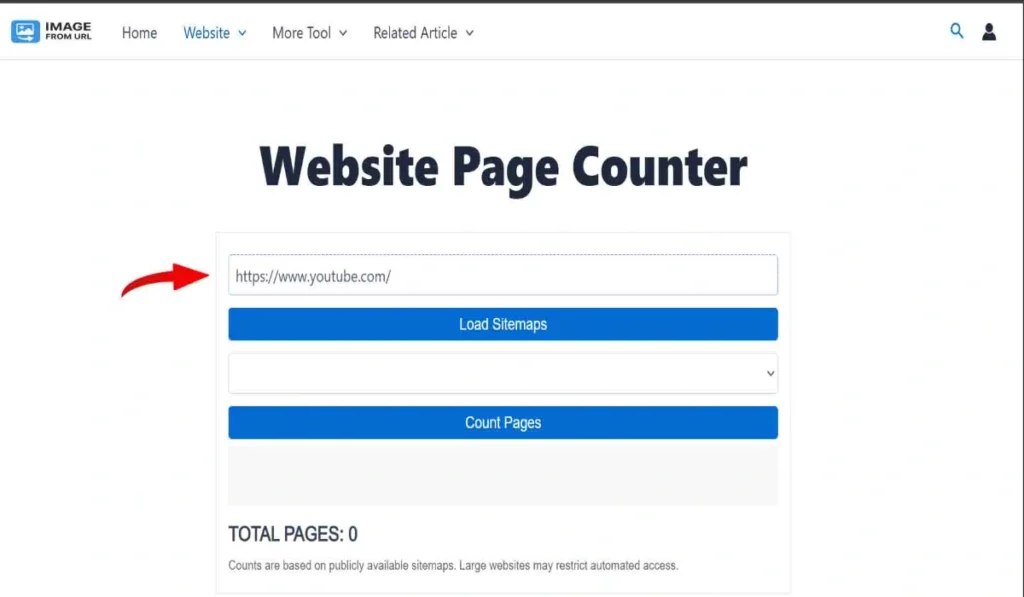
Website URL input field
Step 2: Load Sitemaps
Click the “Load Sitemaps” button.
The tool will:
- Read the website’s
robots.txt - Detect all available sitemap URLs
- Display them in a dropdown list
If no sitemaps are found, the website may not expose them publicly.
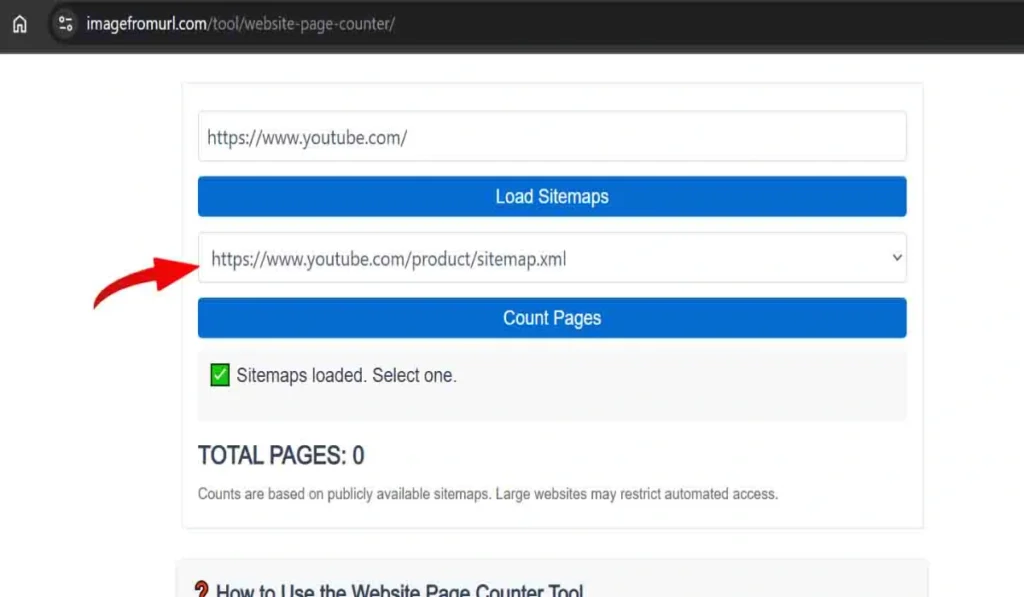
Sitemap list dropdown populated
Step 3: Select a Sitemap
Choose one sitemap at a time from the dropdown.
Large websites typically split their content into multiple sitemaps, such as:
- Post sitemaps
- News sitemaps
- Category sitemaps
- Author sitemaps
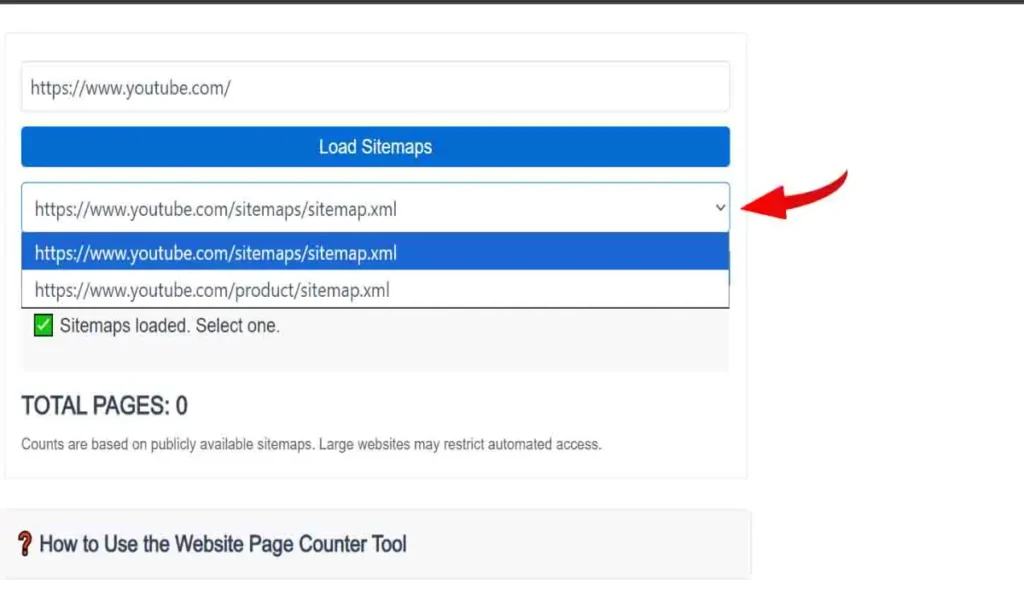
Sitemap selection dropdown
Step 4: Count Pages
Click the “Count Pages” button.
The tool will:
- Fetch only the selected sitemap
- Count the number of pages listed
- Display the result in the log/output area
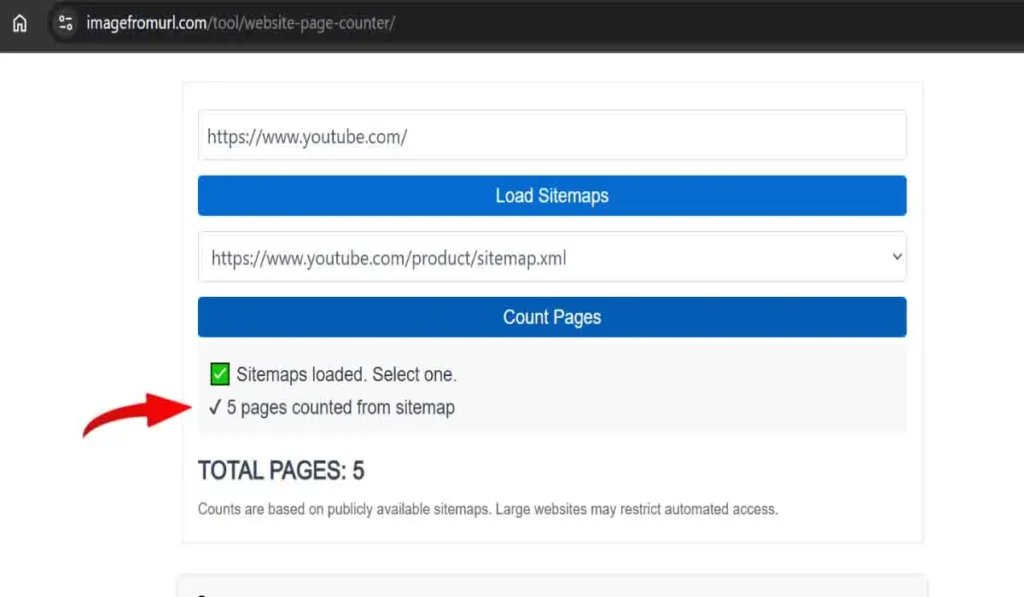
Page count result shown in log area
Step 5: Check the TOTAL Pages Counter
Each sitemap count is automatically added to the TOTAL PAGES counter.
This allows you to safely calculate the overall size of a large website without triggering blocks.
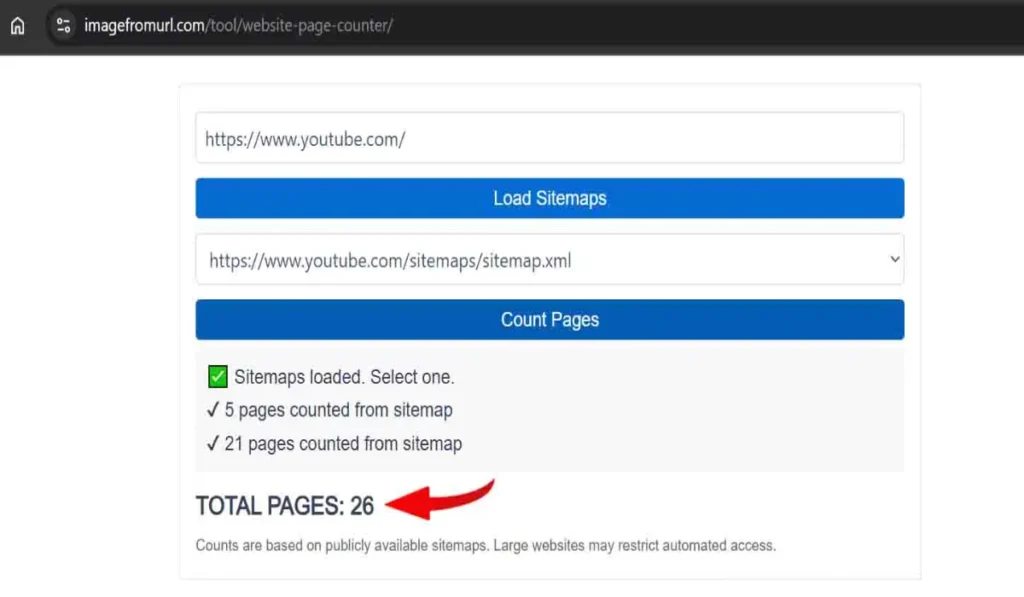
Total pages counter increasing
Step 6: Repeat for Other Sitemaps
Select another sitemap and repeat the counting process until all relevant sitemaps are included.
This manual aggregation method is intentional and helps avoid server restrictions.
Example: Counting Pages of a Large News Website
Let’s say you want to estimate the page count of a large news website.
Step-by-step Example:
- Enter the website URL
- Load sitemaps
- You see multiple sitemaps:
- news-sitemap.xml
- post-sitemap.xml
- category-sitemap.xml
- Count each sitemap individually
- Add results automatically to TOTAL
Result:
You get a realistic estimate without crawling or blocking.
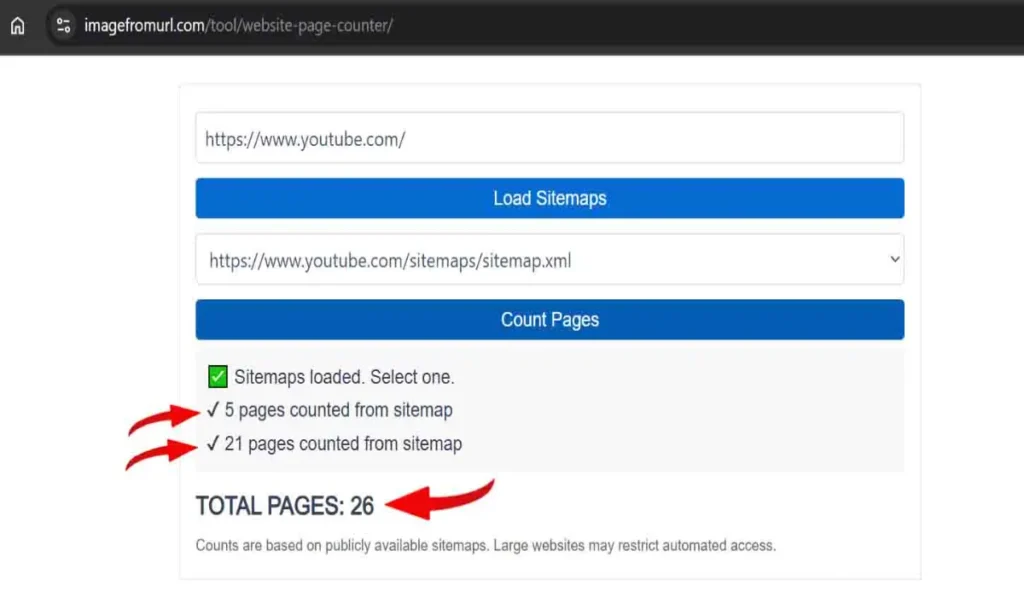
Multiple sitemaps counted and total displayed
Official Website Page Counter Tool Link – Website Page Counter
Common Messages and Their Meaning
“503 Service Unavailable”
The website is temporarily blocking automated access. This is common on large websites. Try again later.
“Sitemap not accessible”
The selected sitemap may be restricted, removed, or temporarily unavailable.
“No sitemaps found”
The website does not declare sitemap URLs in its robots.txt file.
Important Limitations (Honest Disclosure)
While the tool is safe and effective, it is important to understand its limitations:
- It does not crawl websites
- It counts only publicly available sitemap URLs
- Some pages may be excluded intentionally by site owners
- Large websites may limit repeated requests
- Final count is an estimate, not a guarantee
These limitations are unavoidable and apply to all sitemap-based tools.
Who Should Use This Tool?
This tool is ideal for:
- SEO professionals
- Bloggers and content creators
- Website owners
- Digital marketers
- Developers
- Students learning SEO
It is especially useful for:
- News websites
- Media portals
- Content-heavy blogs
Best Practices for Accurate Results
- Always count all relevant sitemaps
- Avoid rapid repeated requests
- Use during off-peak hours for large websites
- Understand that sitemap coverage varies by site
Final Disclaimer
Counts are based on publicly available sitemaps.
Large websites may restrict automated access or hide some pages.
Counting website pages does not require aggressive crawling or expensive tools. By using a sitemap-based approach, the Website Page Counter Tool provides a safe, realistic, and hosting-friendly way to estimate website size—even for large news and media websites.
If you want a reliable page count without risking blocks or server overload, this tool offers a practical solution that actually works in real-world environments.