
In the digital age, every website is filled with images—whether it’s social media, news portals, shopping sites, or blogs. However, when it comes to downloading images directly from a specific website or page, it can often be difficult. Right-clicking is blocked, download options are hidden, and screenshots on mobile devices often result in poor quality.
Best Image Downloader From URL Tool was designed to address this issue. This tool allows you to download HD images from almost any website with just one click.
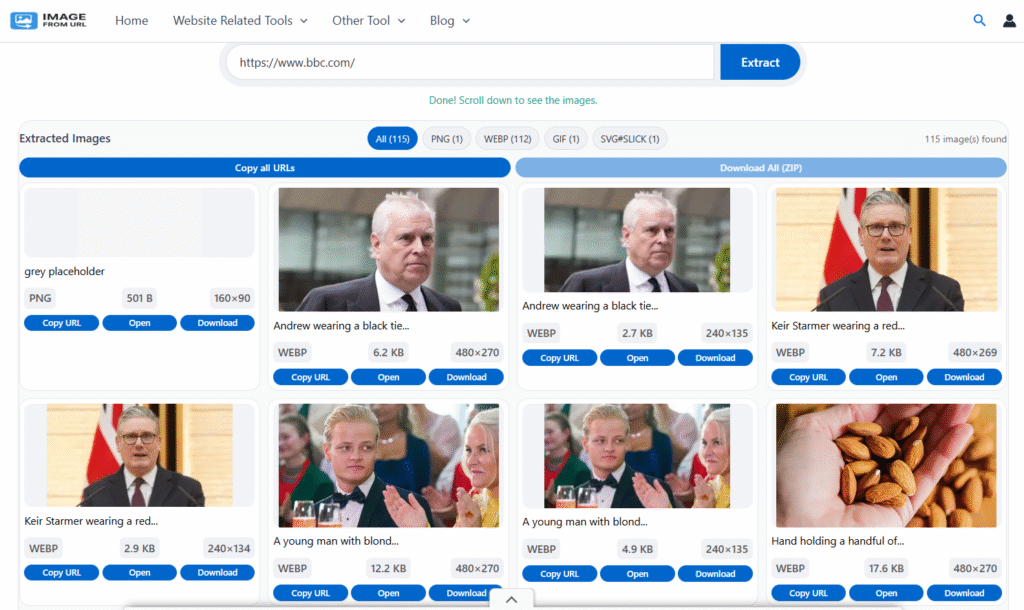 Screenshot: Download pic form internet with link
What is Image From URL?
Image Downloader From URL is a completely web-based tool. You simply enter the URL of any webpage, and the tool automatically scans the page and identifies all the images present there.
This tool also provides a full-quality preview of each image and the option to download it. This means you can not only view the image but also download it to your system or mobile without any quality loss.
Its biggest feature – Supports all websites
Due to its technology, the Image Downloader tool works on almost every website, be it Facebook, Pinterest, shopping portals, news sites, wallpaper portals, or blogs.
The tool’s USPs:
- Client-side (browser-based) image fetching – no server required, so no worries about proxy or IP blocking.
- Smartly handles CORS errors.
- Detects direct, indirect, hidden, lazy-loaded, and background images.
- Fetches both thumbnail and original quality images.
- Images can be easily downloaded even from protected pages.
This is why Google also considers it an all-website-compatible tool.
Why is this the best image downloader URL tool?
- Almost every website supported:
Social media, blogs, ecommerce, or wallpaper sites—it works perfectly on over 99% of platforms. - Direct image URL automatically detected:
It can identify thumbnails, full-size, background, or lazy-loaded images by reading the page structure. - Downloads always in original quality:
Even if the website only shows a preview, the tool fetches the full-resolution image from the background. - No right-click required:
Even if the website blocks right-clicking, you can easily download images with this tool. - Completely mobile-friendly:
Mobile users can save images in full quality by long-pressing on them. - No apps or extensions:
This is a 100% web-based tool; no downloads, installations, or extensions are required. - Safe and secure:
The entire process happens in your browser—no images are saved on the server, nor is any data stored.
Easy Way to Use (Step-by-Step Guide)
1. Open the website.
2. Paste the any type webpage’s URL into the search bar. For example “https://www.facebook.com/” or “https://www.facebook.com/photo/?fbid=122157219512793610&set=gm.1390936069117507&idorvanity=304659754411816”.
3. Click “Fetch Images”
4. The tool will automatically display all images.
5. You’ll find the following options below each image:
- Image Title
- Open Link
- Download Icon
6. Click the download icon and save the image in HD quality.
No time-consuming or technical complications—just fast, easy, and secure image downloads.
Is it legal to download image link?
Downloading publicly available images for personal use is generally fine. However, commercial or professional use of an image without proper licensing or permission may be illegal. Always follow copyright rules and obtain permission from the image owner before commercial use.
Who is this Image URL Downloader Tool for?
This tool is ideal for anyone who needs to extract or download images from any website, such as:
- Bloggers
- Graphic Designers
- Social Media Creators
- Students
- Generalists
- Digital Marketers
- Wallpaper and Meme Creators
- Curators and Educators
If you need to extract website content quickly, safely, and with quality, this tool is a must-have.
Frequency Asked Questions
Why Choose the Best Image Downloader From URL?
Best Image Downloader From URL – Supports All Websites is a boon for users who need to download images from any website in original and HD quality. Its fast speed, compatibility with every platform, and simple interface set it apart from other tools. If you want to avoid the hassle of traditional screenshots or extensions, use this web tool to download your desired images from any website without any hassle.